Enabling Elementor V4 on an existing V3 site does not automatically convert its current pages. Elementor says legacy widgets and Atomic Elements can coexist, which makes a controlled pilot possible. Risk rises when a team treats activation as a sitewide migration without proving its real workflows first.
This guide compares three paths: remain legacy-only, add Atomic Elements to new work, or complete an Atomic-first rebuild. It covers the decision and release process, not individual class or CSS failures.
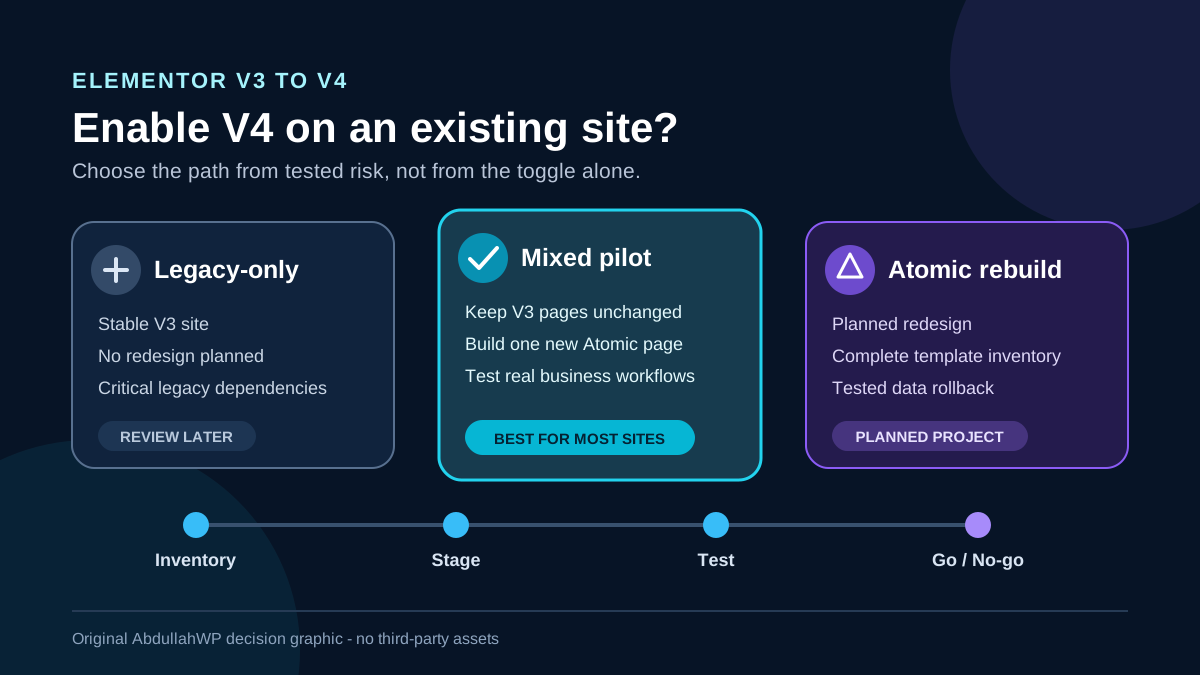
Quick answer: For most established V3 sites, the safest answer is yes, but only as a mixed staging pilot. Activate the Atomic Editor on a staging clone, build one new non-critical page or section with native Atomic Elements, and test the site’s real forms, loops, WooCommerce paths, templates, add-ons, breakpoints, and logged-out output. Keep stable V3 pages unchanged. Choose no-go when a critical workflow has no documented Atomic equivalent, an add-on vendor cannot confirm compatibility, or you cannot restore both files and the database.
Use this decision matrix before enabling V4
| Path | Best fit | Main risk | Decision |
|---|---|---|---|
| Legacy-only | A stable site with no planned redesign, a short maintenance budget, or business-critical V3/add-on workflows | Delaying V4 learning and design-system benefits | Keep V4 inactive; continue safe Core/Pro updates and review again at a defined date |
| Mixed pilot | An existing site that needs a new landing page, section, or content pattern | Two styling systems and unsupported cross-system assumptions | Recommended for most existing sites after staging acceptance tests pass |
| Atomic-first rebuild | A planned redesign or new site with time to rebuild and test every template and workflow | Migration scope, retraining, and feature gaps discovered late | Go only with a complete inventory, signed-off acceptance tests, and a launch rollback plan |
| Do not enable yet | No staging, no current backup restore test, or an unverified checkout, form, loop, multilingual, or add-on dependency | Production failure without a reliable recovery path | No-go until the missing control or compatibility evidence exists |
Know what activation changes and what it does not
Elementor’s current V4 guidance says an existing site is not converted when you update Elementor or activate Atomic features. Atomic Elements appear alongside V3 widgets, and both types can be used on the same page. Existing layouts remain legacy layouts unless you deliberately rebuild them.
The two systems are not interchangeable. V4 Classes and Variables are native to Atomic Elements; they cannot simply be applied to older widgets. Elementor documents a limited sync from V4 color variables and typography classes to V3 Global Colors and Fonts. Font syncing is limited to typography, and the process does not provide a full V3-to-V4 migration.
Activation is disableable; migration work is not automatically reversible. Elementor provides an Atomic Editor switch under Elementor > Editor > Settings, but turning that switch off is not a substitute for restoring changed content and design-system data. Elementor’s FAQ says there is no universal reset for all Atomic local styles or variables, and its legacy/Atomic synchronization is not a two-way migration. Preserve the original V3 page, database, files, and global settings before rebuilding anything.
1. Inventory the site before the staging clone
Create a spreadsheet or change record that names every feature the site must keep. “The homepage looks fine” is not a useful acceptance standard. At minimum, record:
- WordPress, PHP, theme, Core, Pro, WooCommerce, and add-on versions.
- Headers, footers, archives, popups, Loop Items, product, cart, checkout, and account templates.
- V3 global widgets, colors, fonts, custom CSS/code, shortcodes, and dynamic tags.
- Forms with their fields, uploads, email actions, redirects, webhooks, integrations, and stored submissions.
- Loop Grids, custom queries, filters, pagination, taxonomy archives, and product grids.
- Add-ons and the exact widgets, conditions, tags, or scripts each supplies.
- Multilingual, membership, consent, analytics, cache/CDN, accessibility, and SEO integrations.
| Inventory finding | Why it changes the decision |
|---|---|
| Production depends on a third-party V3 widget | An Elementor compatibility tag may cover the current Core version without proving native Atomic support |
| A classic Form uses Redirect, Webhook, Mailchimp, or another integration | The July 2026 Atomic Form documentation lists Email, Email 2, and Collect Submissions; do not assume action parity |
| Atomic elements are planned inside a legacy Loop Grid item | Elementor currently says that direction is not fully supported on the frontend |
| Checkout or account pages generate revenue | A product-capable Atomic Loop does not prove that cart, checkout, gateway, and account workflows are replaceable |
| Shared V3 globals control hundreds of pages | A one-way or partial sync can create two sources of truth unless ownership is defined |
Before updating Core and Pro, follow the Elementor update checklist. Elementor also recommends a backup, release-document review, add-on check, and staging test. A green “compatible” notice does not prove that a vendor’s widget understands Atomic Classes, Variables, or Components.
2. Build a staging and recovery boundary
- Create a staging clone with production’s PHP, theme, plugins, Elementor settings, cache behavior, and representative data.
- Take a files-and-database backup before updating or activating V4. Confirm its location and restore time.
- Export the Elementor kit/design assets, but do not treat a kit as a database backup. Review what a backup must capture for Elementor global settings.
- Record the current Core, Pro, and add-on packages as a known compatible code set.
- Define the data-loss boundary: a database push or old restore can overwrite new orders, users, submissions, bookings, and content.
- Assign one approver for classes, variables, and component masters.
Test the restore on staging for a commercial site. Also document how live orders or leads created after the backup would survive recovery.
3. Build one representative Atomic test page
- Activate the Atomic Editor on staging only.
- Keep the original V3 page unchanged; create a private test page or duplicate a non-critical page.
- Build a section with native Atomic Flexbox, Heading, Paragraph, Image, and Button elements.
- Create two color variables, one typography class, one spacing variable, and two uniquely named reusable classes.
- For Components, create one card and expose only editor-controlled properties. Elementor currently requires Atomic elements, Pro, and admin permission to create or edit a master.
- Add real dynamic content, responsive states, focus/hover behavior, and one relevant add-on or shortcode.
- Publish, reload the editor, and compare logged-in and logged-out desktop, tablet, and mobile output.
The lowest-risk pilot is additive. Build a new non-critical page or section with Atomic Elements and leave the working V3 page intact. Do not start by converting the homepage, global header, checkout, or highest-volume lead form. Additive work provides a clean comparison and an immediate traffic switch-back.
4. Run the workflows that can stop the launch
| Workflow | Acceptance test | No-go result |
|---|---|---|
| Editor and design system | Save, hard-reload, open a fresh login, and verify classes, variables, breakpoints, states, and component instances | Data disappears, permissions are temporary, or the editor throws recurring errors |
| Frontend | Compare public HTML, computed styles, keyboard focus, images, links, and logged-out output | Editor and frontend differ or a required class/rule is missing |
| Forms | Submit every field type; verify email delivery, Email 2, uploads, stored records, spam handling, error/success messages, and every required integration | A business action available in the classic Form has no tested Atomic replacement |
| Loops | Test empty and populated results, dynamic tags, filters, page reload/Ajax pagination, mobile layout, and logged-out caching | Atomic elements are placed inside a legacy Loop Grid item or any query/pagination result differs live |
| WooCommerce | Test product archive, variable product, add-to-cart, mini cart, cart, coupons, shipping, checkout, payment gateway, order email, and My Account | Any price, stock, tax, gateway, consent, or order workflow fails |
| Add-ons and custom code | Exercise each used widget, display condition, popup trigger, dynamic tag, custom event, and shortcode | The vendor cannot reproduce/support the Atomic use or a console/PHP error appears |
| Operations | Clear generated files, page cache, host cache, and CDN in the documented order; then retest privately | Release requires repeated blind cache clears or produces stale public output |
Keep the two Loop directions separate
Elementor 4.2 documents a Pro Atomic Loop with queries, Ajax or page-reload pagination, WooCommerce products, Classes, Variables, and Components. It can use a V3 Loop Item as a temporary bridge. The opposite direction differs: Elementor’s July 2026 FAQ says Atomic Elements inside a legacy Loop Grid template are not fully supported on the frontend. Editor preview is not proof.
Do not assume form action parity
The Atomic Form help article lists Email, Email 2 for Pro, and Collect Submissions. Classic Form documentation also includes Redirect, Webhook, popups, and marketing integrations. Keep a critical classic form when its required action is not present and tested. Use the form email troubleshooting workflow to verify delivery, not only the success message.
Treat WooCommerce as multiple workflows
Atomic Loop support for products is useful for a grid or archive, but it does not prove replacement coverage for every legacy WooCommerce Builder widget. Keep stable product, cart, checkout, and account templates in V3 unless the exact Atomic element is documented and the full transaction test passes. If Pro-only Components, Loops, or other features drive the decision, confirm the current plan entitlement with the Elementor Pro feature and value guide.
5. Record a clear go or no-go outcome
Approve a mixed pilot only when the representative page and every affected workflow pass with the normal user roles and normal security settings. Record which parts remain V3, which new parts may use Atomic Elements, and who owns the design system. A pass is not permission to rebuild the whole site; it approves the tested scope.
- Go, mixed: new non-critical pages can use Atomic Elements; existing V3 templates remain unchanged.
- Go, rebuild: every template and revenue/lead workflow has a named test, owner, launch method, and tested rollback.
- No-go, temporary: a required Form action, Loop direction, Woo workflow, add-on, or user permission is unverified.
- No-go, operational: staging is not representative, the backup cannot be restored, or the deployment would overwrite current live data.
Success condition: the original V3 site remains unchanged, the Atomic pilot survives editor reloads and logged-out checks, all affected business workflows pass, no temporary security or admin workaround is required, and the team can switch traffic back or restore the documented files-and-database state within the agreed recovery window.
6. Release the smallest proven change
- Revalidate Core, Pro, Atomic feature, and add-on versions before release.
- Back up production and identify new live data that must survive rollback.
- Activate V4 without altering existing V3 pages.
- Move only the accepted page/section and required design-system records.
- Publish in a monitored window, purge documented cache layers, and test logged out.
- Repeat the acceptance list, including real form delivery and a test transaction where appropriate.
- Monitor logs, browser errors, submissions, orders, analytics, and support reports.
Do not push a complete staging database over a live store or membership site merely to transfer one page. That can erase transactions created since the staging clone. Use a deployment method that preserves live data, or rebuild the approved page under a controlled content freeze.
7. Understand what each rollback can restore
| Recovery method | What it can help restore | Boundary |
|---|---|---|
| Disable Atomic Editor | Stops the team from continuing the Atomic editing path | Does not recreate deleted V3 content or reverse class, variable, component, and migration decisions |
| Elementor page revision | A saved version of one document | May not restore sitewide design-system records, templates, plugin code, or database changes outside that document |
| Plugin rollback | Elementor Core or Pro code | Does not guarantee that data written by a newer schema is reversed; Core and Pro must remain compatible |
| Design-system export | V4 classes and variables included in the export | Import is whole-file, not selective, and name conflicts require keep-or-override decisions |
| Full backup restore | Known files and database state | Can overwrite orders, leads, users, and edits created after the backup unless a delta plan preserves them |
A component master deserves the same change control as a global template because its structural or visual edits sync to its instances. Likewise, a broad class or variable change can affect multiple pages. Test rollback with the same dependency scope as the change, not only the page currently open in the editor. For style conflicts on a mixed page, follow the Elementor custom CSS diagnosis before adding indiscriminate !important rules.
Recheck these fast-moving details before publishing
This guide was researched against Elementor 4.2.0 and July 2026 help pages. Before acting, recheck Core/Pro compatibility, Atomic Form actions, both Loop directions, WooCommerce coverage, Components requirements, design-system imports, and every add-on vendor’s Atomic support.
Official sources used for this decision
- Elementor V4 FAQ: activation, coexistence, and optional adoption
- Elementor 4.0 launch: existing-site activation and disabling
- Elementor FAQ: reset, migration, sync, and legacy Loop Grid limits
- Elementor: sync Atomic variables with V3 globals
- Elementor Components requirements and permissions
- Elementor Atomic Form elements and actions
- Elementor Atomic Loop, WooCommerce, pagination, and legacy bridge
- Elementor Core and Pro update safeguards
- Elementor add-on compatibility tags
- Official Elementor plugin changelog for version 4.2.0
Frequently asked questions
Will enabling V4 break existing V3 pages?
Elementor says activation does not convert existing layouts, and V3 widgets can remain beside Atomic Elements. Plugin updates, add-ons, custom code, and rebuild work still require staging verification.
Can I turn Elementor V4 off later?
The setting can be disabled, but that does not recreate a replaced V3 page, reverse one-way sync, reset every local value, or restore sitewide design-system changes. Use a known-good backup.
Can V4 Classes style my existing V3 widgets?
No. Elementor says Classes and Variables are native to Atomic Elements. A limited V4-to-V3 sync can expose color variables and typography to the legacy global system, but it is not a complete two-way migration.
Should a WooCommerce site enable Atomic Elements?
Use a mixed pilot, not a revenue-path rebuild. Atomic Loop supports product queries, but cart, checkout, payment, account, tax, stock, and email flows need separate tests. Keep V3 where Atomic coverage is unverified.
Is an Atomic page automatically faster?
Elementor describes leaner Atomic markup but says mixed-page gains vary. Measure the same representative page before and after; do not rely on an architecture claim.
Enable a tested scope, not a promise
V4 does not require an all-at-once migration. A mature V3 site can remain legacy-only, introduce Atomic Elements on new work, or move through a planned rebuild. The right choice comes from inventory, staging parity, workflow evidence, and a recovery boundary that matches the data being changed.
If you need an independent inventory, staging acceptance test, or migration plan for a high-value Elementor site, review the WordPress and Elementor services. Bring the current System Info, add-on list, template map, workflow list, and recovery requirements so the recommendation can be based on the site you actually operate.