A staging site is a snapshot, not a merge branch for WordPress data. While you redesign a page or test a plugin on staging, production may accept orders, register users, save leads, reduce stock, renew subscriptions, create bookings, receive payment webhooks, and run background jobs. Replacing production with the older staging database can erase or rewind those writes even when the new design looks perfect.
This guide explains how to push WordPress staging to production without overwriting orders, users, or leads. The safe pattern is to deploy code and bounded configuration separately from live transactional data, use a documented freeze or delta plan only when database changes are unavoidable, and reconcile every revenue-critical record before reopening.
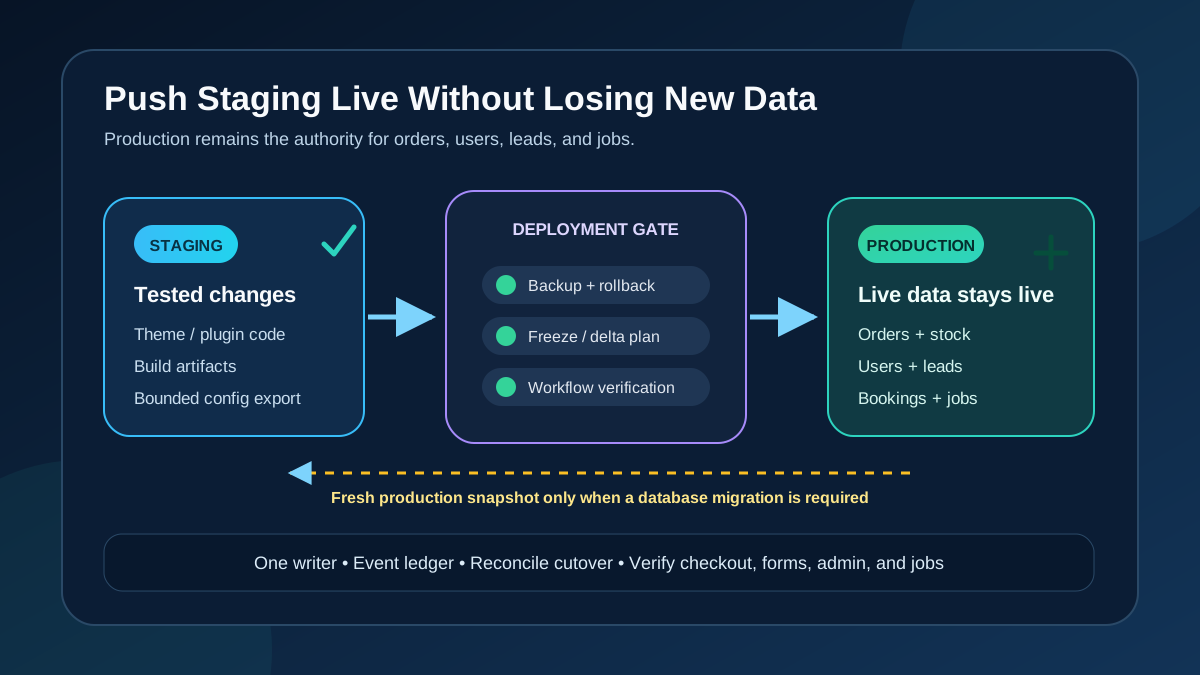
Quick answer: Do not push the full staging database onto an active production site. Inventory every live write, snapshot production immediately before deployment, and promote version-controlled theme, plugin, and configuration files without replacing the live database. Move bounded content or settings through the application’s own export/import tool or a tested migration. If a full database cutover is genuinely required, stop writes, start from a fresh production copy, apply the tested transformation, switch one writer, and reconcile everything created near the cutover.
Choose the deployment path before touching production
| Staging change | Safest usual path | Live data risk |
|---|---|---|
| Theme, child theme, custom plugin, or must-use plugin code | Deploy the reviewed files or build artifact | Low if no schema/config migration is hidden in activation |
| Plugin or WordPress update | Run the same tested update on production, then its supported upgrade routine | Database migrations and background jobs may still write |
| Pages, posts, templates, or reusable design assets | Native export/import, copy API, or a record-aware migration | IDs, media, terms, relationships, and revisions can collide |
| Theme/plugin settings stored in options | Vendor export/import or a versioned, idempotent migration | The options table also contains production-only state |
| Store redesign while orders continue | Deploy code/files; preserve production database and uploads | A database push can erase orders, stock, customers, and jobs |
| Major schema or platform cutover | Fresh live copy, controlled write freeze, tested migration, one-writer cutover | Requires delta capture, reconciliation, and rehearsed rollback |
Why a full staging database push loses live writes
Suppose staging was cloned Monday and pushed Friday. Its database knows only Monday’s orders, users, form entries, comments, stock, and scheduled actions. A table replacement does not ask which Friday rows are newer; it makes the selected staging tables authoritative. WP Engine’s current environment copy documentation explicitly warns that an entire database copy overwrites production and can lose new orders or users. It also notes that selecting tables still overwrites the selected destination tables.
WordPress data is relational even without formal foreign keys. A page can span posts, post meta, terms, relationships, options, and attachment records. A customer spans users and user meta, then may be referenced by orders, memberships, bookings, and plugin tables. Two independently changing environments can also allocate the same numeric ID to different objects. Copying “just the missing row” is therefore not a safe generic merge.
1. Inventory every production write
Begin with business workflows, then map their storage and side effects with each plugin vendor. The WordPress wpdb reference lists core tables such as posts, post meta, users, user meta, comments, terms, and options, but plugins can add custom tables and use several core tables at once.
| Live workflow | Records to protect | Side effects to reconcile |
|---|---|---|
| WooCommerce checkout | Order, items, notes, addresses, stock, customer, payment tokens | Gateway events, emails, webhooks, accounting and fulfillment |
| Registration or membership | User, roles, profile, membership/subscription links | Welcome email, access rules, CRM and billing |
| Lead or support form | Plugin submission records, uploads, post/meta or custom tables | Email, CRM, spreadsheet, webhook and consent log |
| Booking or reservation | Booking, resource, capacity, order and customer references | Calendar sync, reminders and availability |
| Publishing and media | Posts, revisions, terms, attachment rows and upload files | Cache purge, search indexing, feeds and social automation |
| Background automation | WP-Cron and Action Scheduler queues, claims and logs | Renewals, retries, imports, exports and notifications |
Elementor Pro can store form submissions for review and CSV export, as documented in its form submissions guide. That is one example of lead data living beyond a page design. Your forms, CRM, LMS, membership, booking, multilingual, and search plugins may use different storage. Ask each owner for its authoritative records, supported export/import path, and dependencies.
2. Make a restorable checkpoint and isolate staging
WordPress’s official backup guidance states that a full recovery normally needs both database and files. Immediately before deployment, create a destination snapshot, a database export, and a file manifest. Store them outside the web root, label the exact time and time zone, and confirm who can restore them. A backup you have never restored is evidence, not a proven rollback.
- Record production and staging URLs, database names, table prefixes, software versions, and environment type.
- Disable real payment credentials, outbound customer email, production webhooks, indexing, and live API writes on staging.
- Verify staging cannot receive production DNS traffic or a gateway callback.
- Take pre-deployment counts and high-water marks for orders, users, leads, bookings, subscriptions, and pending jobs.
- Document the last known production order, user, submission, and content update by ID and timestamp.
A clone can act like production. WooCommerce warns that an improperly isolated staging site may process live orders. WooCommerce Subscriptions uses staging mode to prevent duplicate automatic payments, but its documentation notes that same-domain database migrations may not trigger that protection. Confirm payment, email, webhook, cron, and integration behavior instead of trusting the word “staging.”
3. Separate code, files, configuration, and content
Deploy code and build artifacts without the database
For a theme or custom plugin change, deploy only the reviewed artifact from version control. Exclude user uploads, cache directories, logs, environment secrets, and generated files unless the application explicitly requires them. Confirm whether activation runs a database upgrade; if it does, treat that routine as a separate migration with its own backup and rollback.
For third-party updates, repeat the tested update on production instead of copying staging’s entire options table. Use a plugin audit to record versions, ownership, license state, database migrations, and critical dependencies.
Move bounded content and configuration through supported tools
WordPress Tools > Export creates WXR containing posts, pages, custom post types, comments, custom fields, taxonomies, and users, according to the official Export screen documentation. It does not promise a complete export of arbitrary plugin tables or operational state. Use it for a controlled editorial set, test the import on a clone, and verify authors, terms, media, internal links, templates, and duplicate handling.
Use native export/import for Elementor templates, form definitions, SEO settings, redirects, or other plugin configuration when available. A standard backup may include stored settings, but understanding what a WordPress backup actually contains is different from having a safe record-level merge. For Elementor-specific recovery, keep the global settings migration boundary separate from transactional data.
4. Identify WooCommerce’s authoritative order storage
Do not use a legacy WooCommerce table exclusion list without checking High-Performance Order Storage. WooCommerce documents four dedicated HPOS tables for orders, addresses, operational data, and order meta. Under legacy storage, orders rely on posts and post meta, while order items and extensions use additional tables. Under HPOS compatibility mode, WooCommerce can synchronize authoritative and backup stores, and there may be pending synchronization.
- Open WooCommerce > Settings > Advanced > Features and record whether HPOS or WordPress post tables are authoritative.
- Record compatibility mode and any pending order synchronization described in the HPOS documentation.
- Inventory order items, notes, customer data, payment tokens, stock, sessions, coupons, refunds, and extension-specific records beyond the four headline tables.
- Confirm every active order-related extension is compatible with the chosen storage.
- Compare order counts, statuses, totals, and the newest order before and after deployment through WooCommerce APIs or admin reports, not raw assumptions.
HPOS makes some targeted operations easier, but it does not make a partial database push automatically safe. Order data connects to users, products, stock, notes, scheduler jobs, webhooks, gateways, memberships, bookings, and subscriptions. Preserve the complete workflow, not only the table with the order number.
5. Protect subscriptions, payments, webhooks, and queues
WooCommerce Subscriptions records the site it considers live and can switch clones to manual renewal behavior. Its staging and migration guide warns that moving a database while keeping the same domain may not trigger staging mode, and an old site can continue recurring payments unless it is decommissioned correctly.
- Check the Subscriptions mode and live URL before and after cutover.
- Ensure only one environment can run renewal, membership, booking, and automation queues.
- Record pending, failed, and in-progress jobs in the Action Scheduler administration screen.
- Pause or redirect production webhooks using gateway/vendor procedures; do not discard events silently.
- Review delivery logs because WooCommerce webhooks can notify external systems about order, product, coupon, and customer changes.
Payment plugins may keep environment identity in options or on a remote service. WooPayments documents that cloning can trigger Safe Mode or leave production in test mode when staging options are copied. Follow the gateway’s current site migration procedure and confirm account identity, mode, webhooks, and a sandbox transaction.
6. Use a write freeze and delta plan only when needed
A code-only deployment usually does not require a long maintenance window. A database replacement, schema cutover, or host migration does. Define exactly which writes must stop: checkout, account creation, forms, publishing, API writes, cron, Action Scheduler, webhooks, imports, and staff edits. Display a 503 maintenance response where appropriate, but remember that a front-end maintenance page alone does not stop gateway callbacks, APIs, CLI jobs, or background workers.
For a full cutover, migrate the newest production state
- Rehearse the migration and time every phase on a recent clone.
- Start the agreed freeze and record its exact timestamp.
- Stop or safely drain background writers and external event delivery.
- Take the final production database and mutable-file snapshot.
- Apply the already-tested transformation to that fresh production copy.
- Switch traffic to one authoritative writer and keep the old environment unable to process jobs or payments.
- Reconcile every event at or after the freeze boundary before reopening.
This is safer than making the week-old staging database live, but it still cannot promise zero loss. DNS caches, gateway retries, long-running requests, and human edits can cross the boundary. The plan needs an event ledger and named owner for each exception.
7. Understand what “selective push” does not solve
Host tools can narrow a deployment to files, folders, or selected database tables. Kinsta’s current push environments documentation describes those choices. Narrower scope is useful, but table selection is not a semantic merge. Selected production tables can still be replaced, and related records may remain in unselected tables.
Require a data-ownership map for every selected table. Record who writes it, its primary and foreign references, whether IDs can collide, what caches or jobs mirror it, and how it will be verified. If the plugin vendor cannot define a supported subset, do not invent one during the live deployment.
Options are especially mixed: a design setting may sit beside URLs, scheduled state, plugin versions, gateway identity, and environment flags. Posts and post meta mix pages with attachments, products, revisions, legacy orders, and custom post types. Users and user meta mix accounts, permissions, preferences, and plugin state. Excluding one famous table does not establish consistency.
8. Treat exports and migrations as tested transformations
Use exports to preserve or move well-defined records, not as proof that every relationship will merge. WP-CLI’s database export command can dump a full database or named tables, but the resulting SQL reflects exactly what was selected. Importing it executes the statements it contains; it does not resolve conflicts.
If domains or paths change, WordPress recommends a serialization-aware process. wp search-replace supports a dry run and table restrictions. Save the report, exclude environment secrets and immutable identifiers as required, and validate serialized settings, GUID policy, media URLs, callbacks, and multisite scope. Never run a broad replacement first on production.
Version custom schema changes so they are idempotent, logged, and safe to rerun or roll forward. Prefer application APIs over hand-written row copying because APIs can preserve validation and side effects. Test with production-scale data and the same HPOS, multilingual, membership, booking, search, and cache configuration.
9. Run the production deployment from a written checklist
- Approve the exact artifact, database transformations, owners, start time, freeze scope, success criteria, and abort threshold.
- Verify the immediate production database-and-files checkpoint and restore access.
- Capture order, user, lead, booking, subscription, stock, webhook, and queue baselines.
- Place only the required write paths into maintenance or queueing mode.
- Deploy code/files first; run supported database migrations against the live data only when required.
- Apply bounded content/config imports and retain their ID mapping and logs.
- Clear only the caches affected by the change.
- Run technical and business acceptance tests before reopening all writes.
- Reconcile the freeze window, re-enable integrations one at a time, and monitor.
10. Verify logged-out, admin, and revenue workflows
- Logged out: homepage, key landing pages, product/catalog, search, forms, login, mobile layout, redirects, assets, and cache behavior.
- Admin: sign in fresh, edit/publish, media upload, user roles, plugin settings, reports, logs, Site Health, cron, and Scheduled Actions.
- Revenue: sandbox checkout, tax, shipping, coupon, stock reduction, order notes/status, gateway webhook, email, refund boundary, and fulfillment integration.
- Leads/users: form submission plus CRM/email result, registration, password reset, consent record, membership access, and booking availability.
- Reconciliation: compare counts, totals, newest IDs/timestamps, failed jobs, webhook deliveries, gateway transactions, and every event logged during the freeze.
The deployment is complete when: production still contains every pre-cutover live record, all freeze-window events are accounted for, only one environment processes payments and jobs, the intended code/content change is visible, and fresh admin plus revenue-flow tests pass with a proven rollback still available.
Rollback without deleting newer production activity
Prefer rolling back the code artifact while preserving the live database when writes resumed after deployment. Restoring the entire pre-deployment database later can erase every order, user, lead, and status change created since the snapshot. If the database itself is corrupt, re-enter maintenance, capture the current failed state, decide which records must be replayed, restore under an incident plan, and reconcile external systems before reopening.
Keep the previous artifact, migration logs, database snapshot, mutable-file backup, event ledger, gateway/webhook records, and named decision owner. The cron backlog guide helps when deployment leaves scheduled work delayed, while the database guide provides table-ownership discipline without turning cleanup into a deployment shortcut.
Frequently asked questions
Can I push only files from staging to production?
Usually, for version-controlled theme or plugin code. Review whether activation runs a schema migration, and exclude uploads, secrets, logs, caches, and environment-specific configuration. Back up production and test the exact artifact first.
Can I exclude WooCommerce order tables and push the rest?
Not safely from a generic list. Storage differs between HPOS and legacy mode, and orders relate to items, notes, users, products, stock, payments, jobs, and extension tables. Map the complete workflow and use a vendor-supported deployment plan.
Does maintenance mode guarantee zero data loss?
No. A page can block shoppers while APIs, webhooks, cron, queue runners, CLI commands, or existing requests continue writing. Stop or queue every writer, record the boundary, and reconcile external events.
Can a plugin automatically merge staging and production databases?
Tools can migrate selected data, but no generic merge understands every plugin’s ownership, IDs, relationships, and side effects. Use record-aware vendor tools for bounded data and rehearse the result on a fresh production clone.
Why not restore the pre-deployment backup if something fails?
It is safe only while writes remain frozen or after newer writes have been captured for replay. Once production reopens, a full restore can delete legitimate activity. Rolling back code or rolling forward a database fix is often safer.
Need a safe WordPress or WooCommerce deployment?
AbdullahWP can map the live data, design the freeze and delta plan, rehearse the deployment, and verify orders, users, leads, and integrations. Review the WordPress support and migration services and include your host, staging age, ecommerce/form stack, HPOS mode, and planned changes.