Automatic Email Obfuscation is a lightweight WordPress plugin that finds visible email addresses and mailto: links in the final front-end HTML, hides the original address from simple source-code scrapers, and reconstructs a readable, clickable address in the visitor’s browser.
It was built for site owners who want automatic coverage without adding a shortcode around every address. It works with content produced by the block editor, classic editor, themes, and page builders such as Elementor because it processes the completed page rather than one editor field.
Quick summary: Activate the plugin and clear every page/CDN cache. It automatically protects valid visible addresses and mailto links on normal HTML pages. There is no settings screen. It is a practical layer against basic harvesting, not a replacement for contact-form spam protection, mailbox filtering, or keeping sensitive addresses private.
What Automatic Email Obfuscation does
- Detects valid plain-text email addresses in rendered front-end pages.
- Processes existing
mailto:links, including subject or body query strings. - Preserves nested icons, spans, classes, and accessibility attributes commonly added by Elementor.
- Skips the WordPress admin, AJAX, JSON, feeds, robots output, and trackbacks.
- Protects code-sensitive blocks including
script,style,textarea,pre,code,template, andsvg. - Handles content inserted after page load with a
MutationObserver. - Adds keyboard activation for plain addresses converted into interactive elements.
- Requires no shortcode and stores no settings or visitor data.
How the protection works
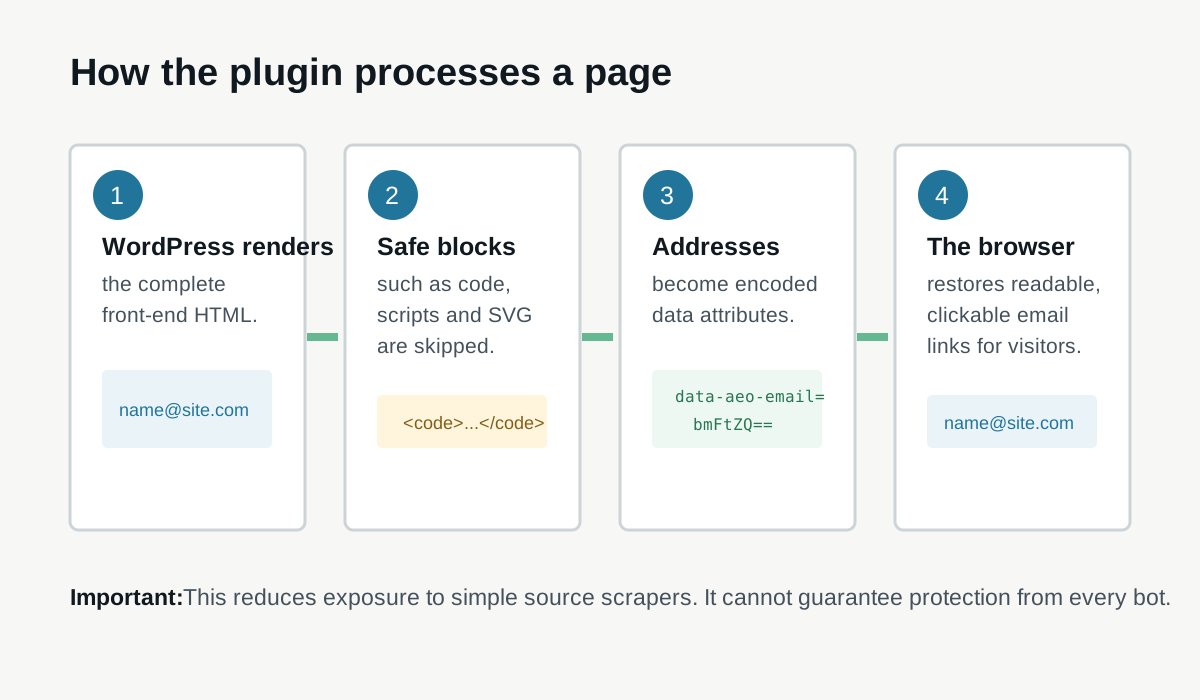
The plugin starts an output buffer at template_redirect. After WordPress, the theme, and active plugins finish rendering the page, it examines the final HTML.
- It temporarily removes blocks and tags that must not be edited.
- It handles complete mailto anchors first, retaining other link attributes and nested markup.
- It replaces valid visible addresses with elements containing a Base64-encoded value.
- It injects a small inline script and style block before
</body>. - The script decodes each value, restores the readable address, and rebuilds the mailto link.
This differs from shortcode-based plugins, which protect only addresses an editor explicitly wraps. WordPress also provides an antispambot function that converts characters to HTML entities. Automatic Email Obfuscation instead works across the completed front-end document and uses browser-side reconstruction.
Useful use cases
| Site or content | Why it helps |
|---|---|
| Elementor contact pages and footers | Protects addresses and mailto buttons without replacing Elementor icon markup. |
| Small-business websites | Reduces obvious address exposure while keeping one-click email links. |
| Team and directory pages | Automatically catches multiple visible addresses in final page output. |
| Older WordPress sites | Avoids manually editing every old post to add a shortcode. |
| Theme templates | Can catch addresses printed outside the post-content filter. |
| Content loaded by front-end JavaScript | Initializes newly inserted protected elements through a DOM observer. |
The plugin is less suitable when an address must remain secret, when JavaScript-free access is required, or when the real problem is automated form submissions. To fix Elementor form delivery and spam issues, use the separate Elementor form not sending email guide.
Installation
Download the current plugin package, then install it from the WordPress plugin uploader:
Download note: The file is hosted on Up-4ever and opens in a new tab. Scan downloaded ZIP files with your security software before installing them on a WordPress site.
- Download the Automatic Email Obfuscation ZIP package using the button above.
- In WordPress, open Plugins > Add New Plugin > Upload Plugin.
- Select the downloaded ZIP file and choose Install Now.
- Activate Automatic Email Obfuscation.
- Purge the WordPress page cache, hosting cache, and CDN cache.
- Follow the verification steps below on a public test page.
Tip: Test on staging first if the site uses aggressive HTML optimization, a consent manager, a page builder with dynamic popups, or a CDN that already performs email obfuscation.
How to verify that it works
- Put a plain address and a mailto button on a test page.
- Open the public page in a private browser window. Both addresses should appear normally.
- Click each address. The visitor’s configured mail application should open with the correct recipient and query values.
- Use Tab to focus the links, then activate them with Enter. Plain converted addresses also support Space.
- Open the original page source with
Ctrl+U, not only the Elements panel. Search for the complete address. It should be absent from the protected markup. - Check the browser console for content-security-policy or JavaScript errors.
- Test again while logged out and after the cache is warmed.
The Elements panel shows the live DOM after JavaScript has run, so seeing the restored address there is expected. Page source shows the HTML initially delivered to that browser, although an edge service may transform it after WordPress.
Elementor and page-builder behavior
Elementor often creates a mail link with nested icon and text spans. The plugin processes the complete anchor, removes only the original mailto value, adds its protection class and data, and replaces a matching visible address without discarding the icon or surrounding markup. Custom link text such as “Email our support team” remains unchanged.
After activation, test header templates, footer templates, popups, loop grids, and mobile menus separately. Cached Elementor HTML should be purged. If a third-party widget renders an address inside an iframe, the parent WordPress page cannot rewrite the iframe’s document.
Accessibility and no-JavaScript behavior
Existing mailto anchors remain native links after initialization. A plain-text address is converted to a focusable element with role="link", tabindex="0", a visible focus outline, and Enter/Space handlers. This follows the main requirements for a custom ARIA link, although MDN recommends native anchor elements where possible because browsers and assistive technology support them more consistently.
Shortcoming: The current version depends on JavaScript. If scripts are disabled, blocked by a strict Content Security Policy, or fail to run, protected email text remains blank and an existing mailto link temporarily uses href="#". Sites with a strict no-JavaScript requirement should use a different technique.
What the plugin does not protect
- JavaScript-capable harvesters: Base64 is encoding, not encryption. A bot that executes the page or decodes the data attribute can recover the address.
- Contact forms: It does not block form spam, fake registrations, comment spam, or abusive API requests.
- Feeds and APIs: RSS/Atom feeds, REST/JSON responses, AJAX responses, and admin screens are intentionally skipped.
- Attributes other than mailto href: Addresses in metadata, custom data attributes, structured data, image metadata, or arbitrary HTML attributes are not rewritten.
- Third-party documents: Iframes and content served from another origin are outside the page output.
- Previously collected addresses: Obfuscation cannot remove an address already indexed, cached, leaked, or sold.
- Non-email contact data: Phone numbers, physical addresses, usernames, and other personal data are not handled.
No method can promise that a public address remains undiscoverable while every human visitor can read it. Even the Cloudflare email-obfuscation feature uses client-side decoding and documents exclusions for attributes, scripts, templates, and non-HTML responses. Treat obfuscation as one layer that raises the cost for basic scrapers.
Compatibility and performance considerations
- Full-page buffering: The complete HTML response is held in memory and processed with regular expressions. The overhead should be modest on normal pages, but unusually large documents deserve measurement.
- Page caching: A cache can serve HTML created before activation. Purge all layers after enabling or disabling the plugin.
- HTML minification: Most minifiers should work, but test the order of transformations. Avoid two email-obfuscation systems rewriting the same link.
- Content Security Policy: The plugin injects inline CSS and JavaScript. A policy that blocks inline assets will prevent reconstruction unless the implementation is adapted to use approved external files or hashes/nonces.
- Streaming or unusual responses: The plugin requires a complete HTML document containing
<htmland</body>. Fragments are left unchanged. - Malformed HTML: The protection logic is careful about common code blocks and tags, but regex-based full-document rewriting is not an HTML parser. Validate complex custom markup.
Troubleshooting
| Problem | What to check |
|---|---|
| Address still appears in page source | Clear all caches; confirm it is visible text or a mailto link and not inside a skipped response or block. |
| Address is blank | Check the browser console, CSP, script optimization, and whether the closing body tag exists. |
| Click does nothing | Confirm JavaScript ran and that the decoded mailto is present in the live DOM. |
| Elementor icon or styling changed | Inspect duplicate classes and test without HTML optimization; report the widget’s rendered anchor markup. |
| Subject/body is wrong | Test encoded spaces, ampersands, and non-ASCII content in the mailto query. |
| Only API-loaded address is exposed | The plugin deliberately skips JSON/AJAX responses; protect or redesign that endpoint separately. |
How it compares with other approaches
| Approach | Advantage | Tradeoff |
|---|---|---|
| Automatic Email Obfuscation | No shortcode; catches final front-end HTML and preserves Elementor links | Requires JavaScript and has no exclusions/settings UI |
Shortcode plus antispambot() | Simple, native WordPress function; can work without JavaScript | Editors must wrap each address; entity decoding is easy for modern bots |
| Content-filter encoder plugin | Often lightweight and JavaScript-free | May miss addresses outside filtered fields unless full-page protection is included |
| Cloudflare Scrape Shield | Transforms eligible HTML at the network edge | Requires proxied Cloudflare traffic and can overlap with WordPress-side protection |
| Contact form only | Keeps the destination address out of public page content | Needs delivery, abuse, privacy, and accessibility controls |
Choose one primary obfuscation layer. Running this plugin together with Cloudflare email obfuscation or another full-page encoder can cause double processing and makes troubleshooting harder.
Privacy and security notes
The plugin stores no settings, cookies, analytics, or visitor information and makes no external requests. It changes only front-end output. However, publishing a personal address still exposes personal data to human visitors and capable automation. Use a role address such as support@ or hello@, apply mailbox spam filtering, and avoid publishing private employee addresses unless there is a clear reason.
Best fit: Use Automatic Email Obfuscation when addresses must remain visible and clickable, most visitors run JavaScript, and you want automatic WordPress/Elementor coverage without shortcodes. Pair it with mailbox filtering and separate form protection.
Frequently asked questions
Will it stop all email spam?
No. It can reduce harvesting by simple bots that scan initial HTML for plain addresses. It cannot stop advanced scrapers, form abuse, data breaches, guessed addresses, or spam sent to an address obtained elsewhere.
Does it work with Elementor?
It is designed to preserve Elementor’s nested icon and text markup while processing mailto links. Test every widget/template type used on the site because third-party add-ons can produce different HTML.
Does it change emails in the WordPress database?
No. It transforms the final HTML response. The original post, template, widget, and database values remain unchanged.
Can search engines still see the address?
A crawler that renders JavaScript may see the reconstructed address. The plugin is intended to deter basic harvesting, not to hide content from search engines or guarantee de-indexing of an address.
Is Base64 encryption?
No. Base64 is a reversible representation of data. It removes the recognizable address from initial visible text but provides no cryptographic secrecy.
Support and responsible testing
When reporting a compatibility problem, include the WordPress theme or builder, the widget involved, whether caching/minification/CDN obfuscation is active, a small sample of the rendered anchor markup, and any browser-console error. Do not post a private address or access credential in a public report.
For help testing the plugin on a production WordPress or Elementor setup, see AbdullahWP WordPress services.