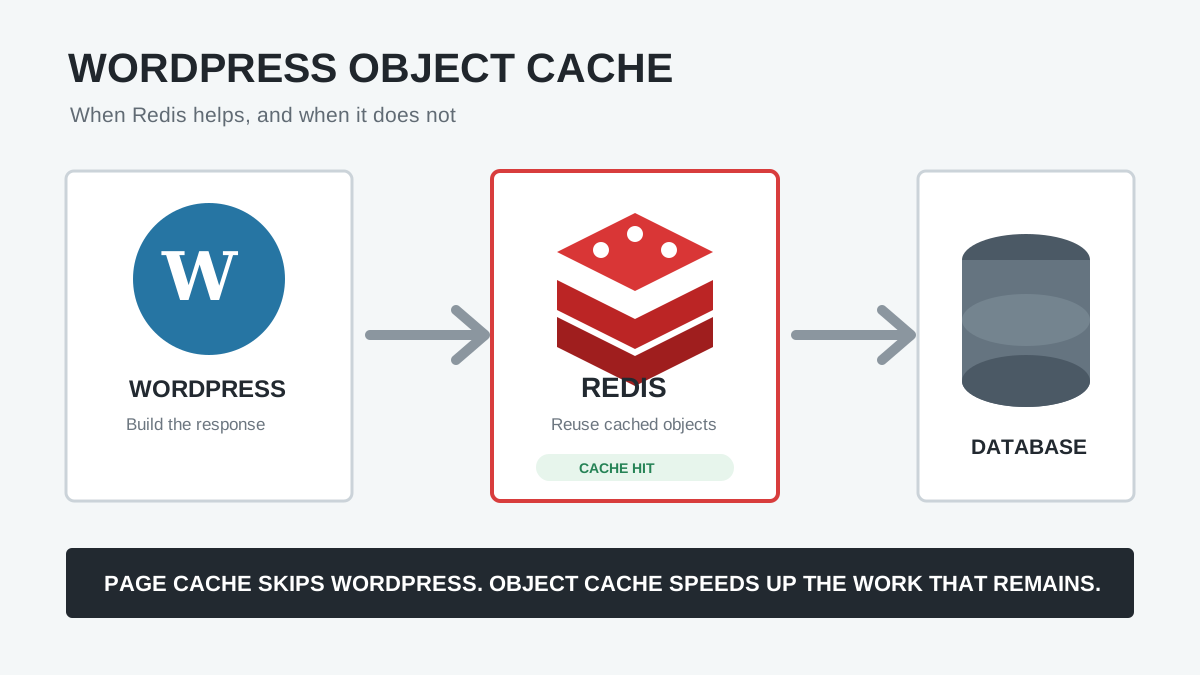
Redis object caching can make a busy WordPress site faster, but it is not a universal speed switch. It does not compress images, optimize JavaScript, replace a full-page cache, or repair an inefficient query. On a small brochure site whose public pages are already served from page cache, enabling Redis may produce almost no visible change.
This guide explains how WordPress object caching works, when Redis is worth using, when it is unlikely to help, how to enable it safely, and how to prove whether it improved the requests that matter.
Quick answer: Redis is most useful when WordPress must run and repeatedly fetch the same database-backed objects: logged-in users, WooCommerce carts and checkout, membership sites, wp-admin, API requests, complex menus, product data, and high-traffic cache misses. It is less useful for anonymous visitors already receiving cached HTML or for performance problems caused by frontend assets and third-party scripts.
What is the WordPress object cache?
WordPress uses an object cache to store data that would otherwise require another database query or expensive calculation during a request. Plugins and Core access it through functions such as wp_cache_get() and wp_cache_set().
The default cache is not persistent. Its contents live in PHP memory only while WordPress builds the current response, then disappear. It can prevent duplicate work inside one request, but the next page load starts with an empty cache.
A persistent object-cache plugin installs an object-cache.php drop-in inside wp-content. WordPress loads that file and stores cache objects in an external backend such as Redis, Memcached, SQLite, or another supported system. The next request can reuse them.
Tip: Adding define( 'WP_CACHE', true ); by itself does not create a persistent object cache. WordPress documentation states that persistence requires a cache backend and drop-in.
Object cache vs page cache, browser cache, and OPcache
| Cache layer | What it stores | What it avoids | Best fit |
|---|---|---|---|
| Browser cache | Images, CSS, JavaScript, fonts, and responses on the visitor’s device | Repeat network downloads | Returning visitors and static assets |
| Full-page cache | Finished HTML response | Most or all WordPress/PHP/database work | Anonymous visitors viewing cacheable pages |
| Persistent object cache | Posts, options, users, metadata, query results, transients, and plugin objects | Repeated database work while WordPress still runs | Dynamic, personalized, logged-in, admin, and cache-miss requests |
| PHP OPcache | Compiled PHP bytecode | Recompiling PHP files | Almost every PHP application request |
These layers complement each other. A full-page cache is usually the largest win for a public article because it skips WordPress entirely. Redis helps the requests that cannot use that cached HTML or when a page-cache miss still needs to be assembled.
Warning: Do not replace a working page cache with Redis and expect the same result. Object caching speeds up parts of WordPress execution; page caching can bypass that execution.
When Redis object caching helps WordPress
WooCommerce stores
Cart, checkout, account, product filtering, stock, pricing, and personalized sessions are normally excluded from full-page cache or vary by user. WordPress and WooCommerce repeatedly load posts, terms, options, users, product metadata, and extension data. A persistent cache can reduce repeat database lookups while these dynamic pages are built.
Membership, LMS, community, and logged-in sites
Personal dashboards, course progress, permissions, profiles, private content, forums, and user-specific navigation often cannot share full HTML. Redis can help when many concurrent users request overlapping WordPress objects even though their final pages differ.
Large content and custom-field sites
Sites with many posts, terms, users, menus, relationships, custom fields, and repeated WP_Query calls may reuse substantial data across requests. WordPress Site Health can recommend a persistent object cache when site characteristics cross configurable thresholds.
wp-admin, WP-CLI, cron, and REST API work
Page cache generally does not accelerate the WordPress dashboard or most authenticated application requests. Repeated object lookups during imports, scheduled jobs, API traffic, and administration can benefit, although long-running imports require careful invalidation and memory monitoring.
Traffic spikes with many page-cache misses
When a cache expires or many uncached URLs are requested, WordPress must rebuild responses. Redis can reduce the database load during that work and help protect MySQL from repeated reads.
When Redis probably will not help much
| Situation | Why Redis is not the main fix | Investigate instead |
|---|---|---|
| Small brochure site with warm page cache | WordPress does not run for most public requests | Cache hit rate, CDN, images, fonts, and frontend delivery |
| Slow hero image or LCP resource | Redis does not reduce image bytes or discovery delay | Elementor LCP optimization |
| Slow interaction caused by JavaScript | Object cache does not shorten browser long tasks | Elementor INP diagnosis |
| Third-party chat, ads, maps, or analytics | The browser waits on external origins and scripts | Delay, remove, or replace the third party |
| One unique expensive query per request | There may be no reusable cached result | Query logic, indexes, schema, and result size |
| Remote Redis has high latency | Network calls can cost more than local database reads | Local socket/host, connection latency, architecture |
| Server is already short on RAM | Redis competes with PHP, MySQL, and OS cache | Memory sizing or a larger server |
A cache hit is useful only when retrieving and decoding the cached object costs less than rebuilding it. Redis should be close to WordPress, correctly sized, and used by code that actually reuses objects.
Should you enable Redis? Use this checklist
- Does the host provide and support Redis or a compatible persistent object cache?
- Are important requests dynamic, logged-in, personalized, administrative, or excluded from page cache?
- Do repeated requests show meaningful database query time or high MySQL load?
- Does Site Health recommend a persistent object cache?
- Can you measure the same uncached and logged-in workflows before and after?
- Is enough RAM available after PHP, MySQL, and the operating system are accounted for?
- Can every WordPress installation use a unique Redis database or key prefix?
- Is there a tested way to disable the drop-in if Redis becomes unavailable?
If most answers are yes, a controlled Redis trial is reasonable. If the only evidence is a generic speed-scan recommendation, measure the actual bottleneck first.
What Redis changes in the request path

On a cache miss, WordPress reads data from MySQL, builds the object, and stores it in Redis. On a later cache hit, WordPress retrieves the object from Redis and avoids the database trip. Cache invalidation removes or replaces entries when content changes.
Redis must never become the only copy of posts, orders, users, or settings. MySQL remains the source of truth. The object cache must be disposable: flushing it may slow the next requests while the cache warms, but it should not delete canonical WordPress data.
Measure a baseline before enabling Redis
Test workflows that bypass or miss full-page cache. A homepage cache hit is a poor Redis benchmark because WordPress may not execute.
| Workflow | Record |
|---|---|
| Logged-out cache hit | Confirm page-cache status; expect little Redis effect |
| Logged-out cache miss | TTFB, PHP time, query count/time, peak memory |
| Logged-in account/dashboard | Median and slow-tail response time |
| WooCommerce cart and checkout | Response time, correctness, queries, session behavior |
| wp-admin screens | List-table and editor load time |
| REST/API endpoint | Response time under repeated requests and concurrency |
| Server | MySQL CPU, PHP workers, RAM, swap, and database load |
Run each workflow several times. The first Redis request may be a miss; later requests show warm-cache behavior. Compare medians and slower percentiles, not only the fastest result.
Redis requirements WordPress plugins cannot provide alone
- A running Redis server or managed Redis service.
- A PHP client such as PhpRedis, Predis, or another client supported by the chosen drop-in.
- Network or Unix-socket access from PHP to Redis.
- Authentication and TLS when the architecture requires remote connections.
- A dedicated database or unique human-readable key prefix for each WordPress installation.
- A memory limit and eviction policy suitable for cache data.
- Monitoring for connection errors, latency, memory, evictions, hit ratio, and rejected writes.
- A documented emergency bypass.
Ask the hosting provider first. Managed hosts often expose Redis through their panel and supply the correct host, port, socket, credentials, database, and supported plugin. Installing a WordPress plugin cannot start a Redis service on hosting that does not provide one.
Safe Redis Object Cache setup for WordPress
- Create a full files and database backup.
- Test on staging with similar hosting and traffic characteristics.
- Confirm Redis is running and reachable only through an approved local, private, or secured connection.
- Record baseline measurements.
- Install the host-recommended object-cache plugin or drop-in.
- Add the connection settings before enabling the object cache.
- Use a unique database and readable key prefix.
- Enable the drop-in and confirm it is valid and connected.
- Warm the cache by repeating the test workflows.
- Compare performance and verify dynamic correctness.
- Monitor memory, evictions, hit ratio, and errors under normal traffic.
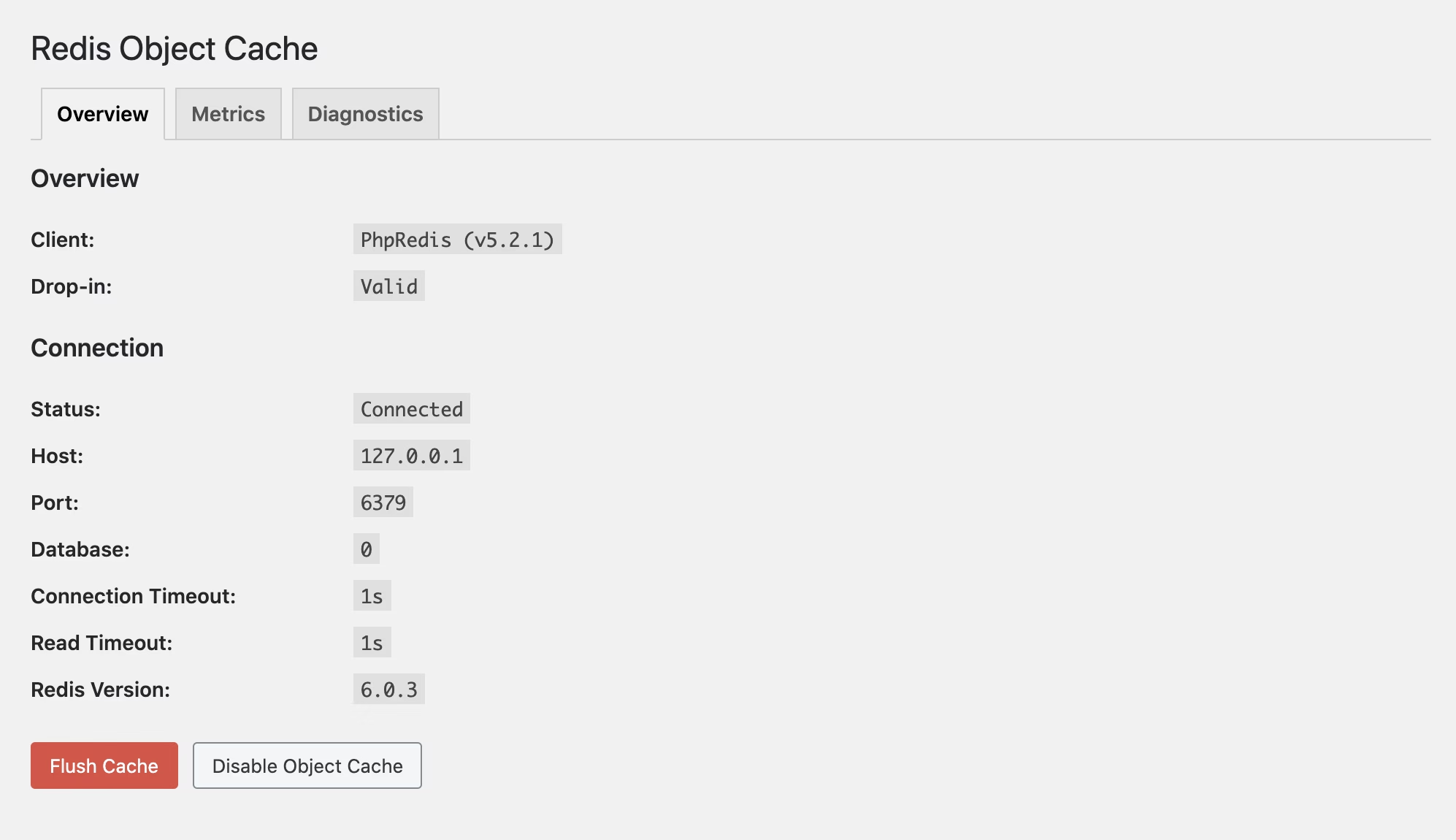
object-cache.php drop-in is valid. Official Redis Object Cache screenshot from WordPress.org.Example Redis Object Cache configuration
The exact values must come from your host. The open-source Redis Object Cache plugin supports configuration constants such as:
define( 'WP_REDIS_HOST', '127.0.0.1' );
define( 'WP_REDIS_PORT', 6379 );
define( 'WP_REDIS_DATABASE', 0 );
define( 'WP_REDIS_PREFIX', 'example.com:' );
define( 'WP_REDIS_TIMEOUT', 1 );
define( 'WP_REDIS_READ_TIMEOUT', 1 );
Place configuration in wp-config.php before WordPress stops editing. Do not copy the host, port, database, or timeout blindly. A local Unix socket may be faster and safer when the host supports it; a remote service may require TLS and Redis ACL credentials.
Warning: Never expose Redis directly to the public internet without proper network controls and authentication. Do not publish Redis passwords in screenshots, support tickets, source repositories, or article comments.
Why every WordPress site needs a unique prefix
If several sites share a Redis database without unique key namespaces, one installation can collide with or flush another site’s cached objects. That can cause incorrect content, login problems, stale data, or confusing cross-site behavior.
- Assign a separate Redis database when the platform supports it.
- Always use a unique
WP_REDIS_PREFIX. - Make the prefix readable enough to identify its owner.
- Understand whether the plugin’s flush command clears only the prefix or the whole Redis database.
- Document staging and production prefixes separately.
Do not use a secret-looking random value as the prefix. The plugin documentation describes it as a readable namespace, not an authentication salt.
Set a memory limit and understand eviction
Redis stores data in memory. Without sensible limits, cache growth can compete with MySQL and PHP or exhaust the server. When Redis reaches maxmemory, its eviction policy determines what happens.
| Signal | What it may mean |
|---|---|
| High and rising evictions | The cache is too small, the workload is churning, or the policy is a poor fit |
| Low hit ratio after warm-up | Objects are not reused, expire too quickly, or are evicted before reuse |
| Rejected writes / noeviction errors | Redis reached its limit and cannot store new cache entries |
| Swap usage | The server is under memory pressure; in-memory performance may collapse |
| Slow Redis response time | Remote latency, server pressure, oversized values, or connection trouble |
Redis documentation lists allkeys-lru as a common default when a subset of cache entries is accessed more often than the rest, but the correct policy depends on the application and hosting design. Managed-host settings should not be changed without their guidance.
How to verify Redis is helping
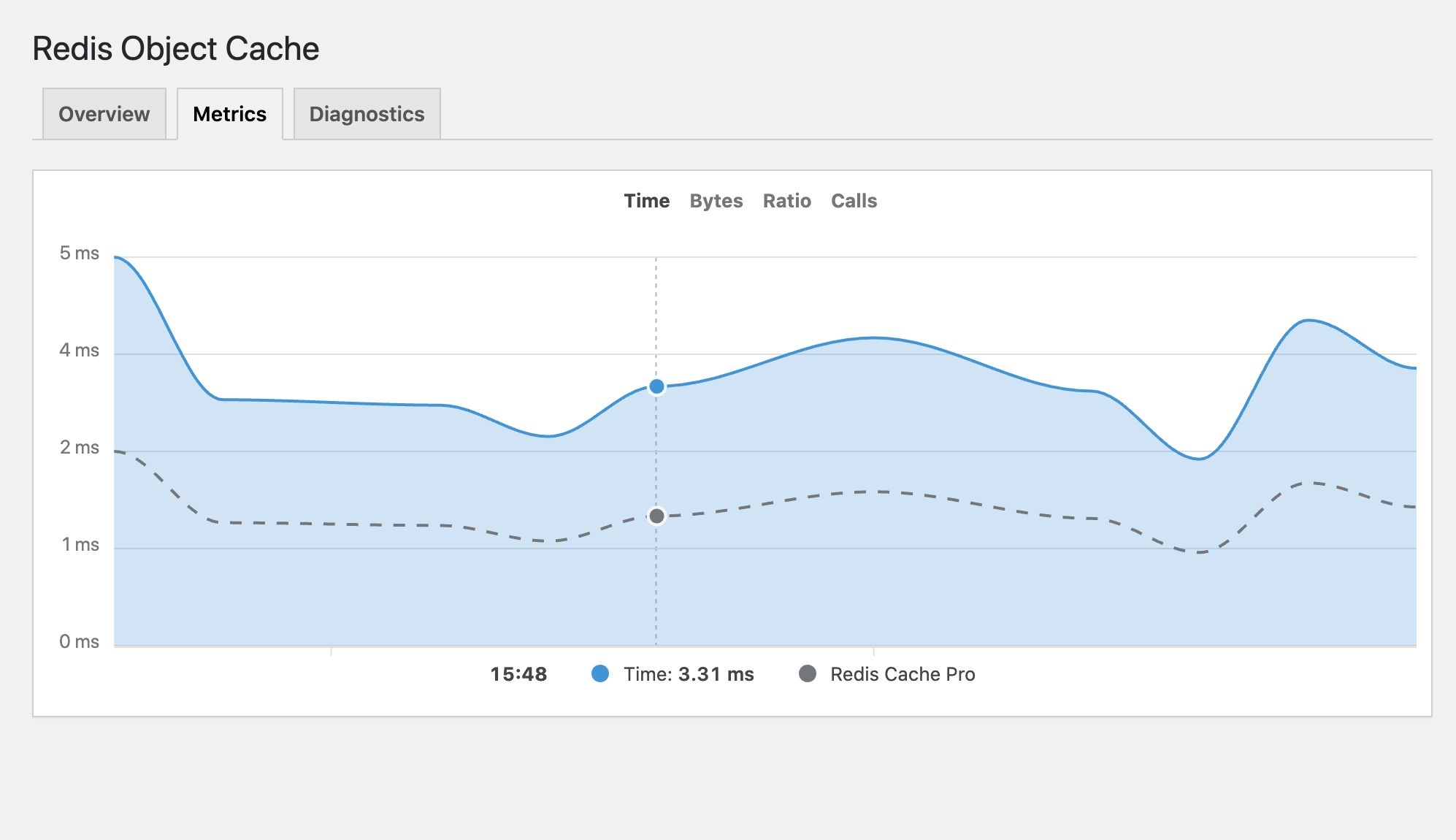
- Repeat the exact baseline workflows.
- Separate page-cache hits from requests where WordPress ran.
- Compare TTFB and server time across several warm requests.
- Compare database query count and query time where profiling is available.
- Check Redis hit ratio, response time, used memory, and evictions.
- Review MySQL CPU and load during comparable traffic.
- Test concurrency rather than only one browser request.
- Confirm carts, prices, permissions, forms, logged-in content, and admin updates remain correct.
A high hit ratio is not the final goal. The real outcome is lower backend time and database load without stale or incorrect data. If Redis adds latency, consumes scarce RAM, or does not improve the relevant requests, disable it and investigate the actual bottleneck.
What to do if Redis slows or breaks WordPress
- Record the error and exact time.
- Use the plugin’s supported disable command or set its documented emergency bypass when wp-admin is unavailable.
- Remove or rename only the responsible
object-cache.phpdrop-in if the plugin’s recovery instructions require it. - Confirm WordPress works with the default non-persistent cache.
- Check Redis availability, credentials, socket permissions, DNS, TLS, and timeouts.
- Check server memory, swap, evictions, rejected commands, and Redis latency.
- Verify no second cache plugin replaced the drop-in.
- Re-enable only after the cause is understood and staging passes.
Flushing is not the first fix for every problem. It creates a cold cache and can increase database load while objects are repopulated. Flush when invalidation is genuinely stale or when the plugin/update procedure calls for it.
Common Redis object-cache mistakes
- Installing the plugin when no Redis server exists.
- Benchmarking only a full-page-cache hit.
- Sharing database 0 without unique prefixes.
- Using Redis over a slow remote connection.
- Allocating RAM without considering MySQL and PHP.
- Running competing plugins that manage
object-cache.php. - Publishing passwords or disabling TLS verification casually.
- Using cache flush as routine maintenance.
- Assuming Redis fixes slow frontend assets.
- Keeping Redis because Site Health is green even though measurements are worse.
Success: Redis is worthwhile when warm dynamic requests become measurably faster, database load falls, the cache remains within its memory budget, evictions are controlled, and personalized content stays correct.
Frequently asked questions
Does WordPress already have an object cache?
Yes, but the default cache lasts only for the current PHP request. A persistent drop-in backed by Redis or another supported service makes reusable objects available to later requests.
Do I need Redis if I use a page-cache plugin?
Possibly. Page cache handles cacheable HTML, while Redis can help logged-in, personalized, administrative, API, cart, checkout, and cache-miss requests. Measure those paths before deciding.
Will Redis improve PageSpeed Insights?
Only indirectly when backend response time is a meaningful part of the tested load and page cache does not already handle it. Redis does not optimize images, CSS, JavaScript, fonts, layout shift, or browser interaction work.
Is Redis useful for Elementor?
It can reduce repeated WordPress data retrieval while Elementor templates are rendered, especially on dynamic or uncached pages. It does not reduce Elementor’s frontend CSS, DOM, image weight, or JavaScript execution.
Redis or Memcached: which should WordPress use?
Both can provide persistent object caching. Use the backend your host supports well, can monitor, and integrates safely with your WordPress stack. Operational reliability matters more than choosing by name alone.
Sources and further reading
- WordPress Developer Reference: WP_Object_Cache
- WordPress Core: Persistent Object Cache Site Health check
- WordPress Developer Blog: Transients and object caching
- Redis Object Cache plugin on WordPress.org
- Redis Object Cache configuration and source code
- Redis key eviction documentation
Enable Redis for a measured reason
Redis is a valuable WordPress backend tool when requests repeatedly reuse database-backed objects and cannot be served as full cached pages. It is not a substitute for page caching, efficient queries, sufficient hosting, or frontend optimization.
Measure the dynamic paths, configure Redis with isolation and recovery in mind, and keep it only when the evidence improves. For help auditing WordPress backend performance and cache layers, contact AbdullahWP or review the available WordPress performance services.