If you are building a WordPress website, you have undoubtedly heard of Elementor. As one of the most popular page builders for WordPress, it has completely revolutionized how creators, business owners, and developers design websites.
With its intuitive visual drag and drop interface, anyone can build beautiful pages without touching a single line of code. However, when you start pushing the boundaries of your web design, you will eventually face the ultimate question: is Elementor Pro worth it?
While the free version of Elementor offers a fantastic starting point for basic landing pages, the Pro version unlocks professional-grade marketing tools, dynamic capabilities, and complete structural control over your site.
In this comprehensive 2026 review, we are going to dive deep into the differences between the two versions, look at the latest pricing, and help you decide which version is right for your specific needs.
What is the difference between Elementor and Elementor Pro?
To make an informed decision, you need to understand exactly what you are getting with each tier.
The Free Version of Elementor
The core free plugin is incredibly generous. It gives you full access to the standard drag and drop editor and includes 32 basic widgets (like headings, images, text editors, basic buttons, and spacers). It allows you to build standard pages and tweak global colors and typography.
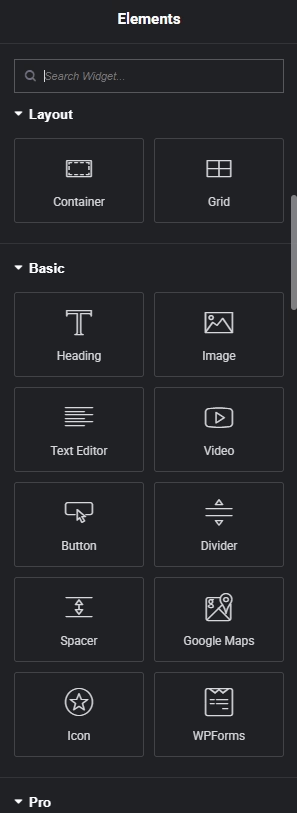
However, the free version is strictly a page builder. It lets you design the content area of a specific page, but it does not allow you to alter your theme’s core structure (like the header, footer, or archive pages).
The Pro Version (Elementor Pro)
When you upgrade to Elementor Pro, the plugin transforms from a simple page layout tool into a comprehensive theme builder and marketing powerhouse.
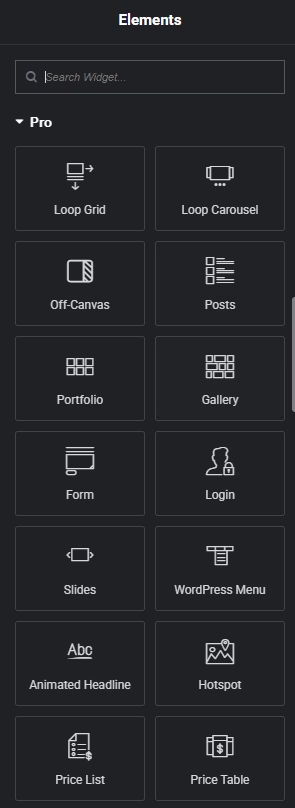
The pro version gives you up to 85+ advanced widgets, including animated headlines, pricing tables, slides, and media carousels. More importantly, it gives you complete access to the theme builder, allowing you to fully customize custom headers footers, 404 pages, and archive layouts.
Feature Comparison Table
Here is a quick breakdown of what you get in the free version versus the premium tiers:
| Feature | Elementor Free | Elementor Essential | Advanced Solo | Advanced | Expert |
| Site Licenses | Unlimited | 1 Site | 1 Site | 3 Sites | 25 Sites |
| Pro Widgets | No (32 Free only) | 57 Pro Widgets | 85 Pro Widgets | 85 Pro Widgets | 85 Pro Widgets |
| Theme Builder | No | Yes | Yes | Yes | Yes |
| Form Builder | No | Yes | Yes | Yes | Yes |
| Dynamic Content | No | No | Yes | Yes | Yes |
| Popup Builder | No | No | Yes | Yes | Yes |
| WooCommerce Builder | No | No | Yes | Yes | Yes |
| Custom CSS | No | No | Yes | Yes | Yes |
| Support | Community | Basic | Basic | Basic | Priority |
(Note: If you have older layouts, you might also want to convert Elementor sections to containers to take full advantage of Pro’s advanced Flexbox capabilities).
How much is Elementor Pro?
Pricing is often the deciding factor for freelancers and small business owners. So, how much is Elementor Pro going to cost you?
Elementor recently updated its pricing structure to better accommodate different types of users, from hobbyists to scaling design agencies.
Elementor Pro Pricing Table (2026)
| Plan Name | Price (Billed Annually) | Number of Sites | Best For |
| Essential | $60 / year | 1 Website | Basic websites that need theme building and forms. |
| Advanced Solo | $84 / year | 1 Website | Professional single sites needing WooCommerce & Popups. |
| Advanced | $108 / year | 3 Websites | Freelancers or businesses with a small portfolio of sites. |
| Expert | $204 / year | 25 Websites | Web designers building multiple client sites. |
Note: Elementor also offers specialized “Elementor One” plans starting at $168/year which bundle the Pro builder with Image Optimization, Accessibility scanners, and premium email deliverability credits.
Can I buy Elementor Pro monthly?
No, the standard Elementor Pro plugin licenses (Essential, Advanced Solo, Advanced, Expert) are billed annually. However, if you purchase their hosted “Elementor One Agency” bundle, they do offer a monthly payment option (currently around $47/month). But for the standalone plugin, it requires a yearly commitment.
Is Elementor Pro one time payment?
No, Elementor Pro is not a one time payment. It operates on a yearly subscription model. If you choose not to renew your license, your website will not break—it will stay exactly as you designed it. However, you will lose access to premium support, software updates, and the ability to drag new Pro widgets onto your pages.
(Pro tip: If you ever experience issues updating your plugin, such as the dreaded Elementor 500 error when saving, having an active license ensures you can reach out to premium support for a fix).
Top Reasons to Upgrade to Elementor Pro
If you are on the fence, here is a detailed look at the tools that make Elementor Pro a worthwhile investment for your WordPress website.
1. Total Control with the Theme Builder
If you are frustrated by your WordPress theme’s limitations, this feature alone justifies the price tag. Access to the theme builder allows you to ditch restrictive themes and visually design your global layout.
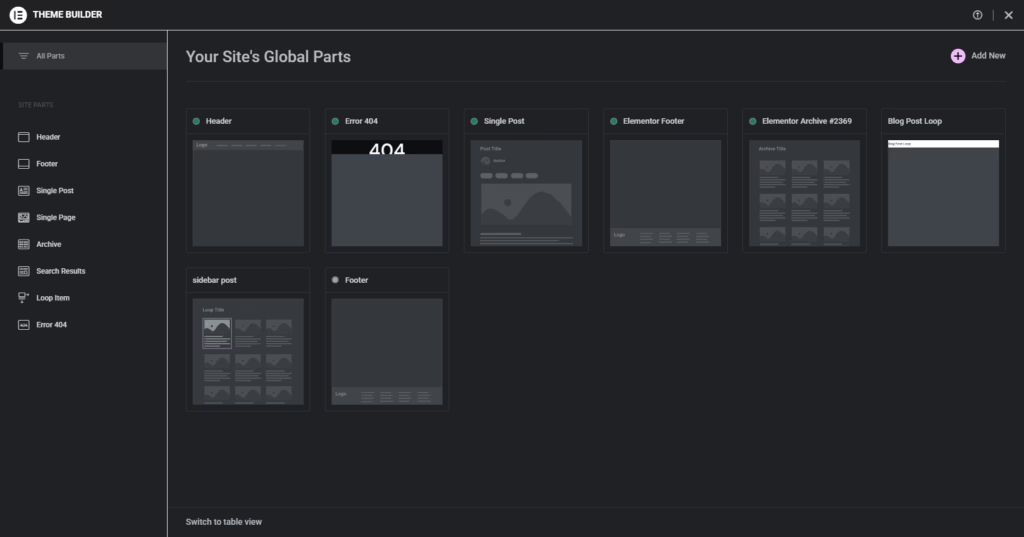
You can design custom sticky headers (no need for complex Elementor sticky header code), design a unique footer single post layout, and create beautiful archive pages for your blog. You are in 100% control of the user experience. You can even export Elementor global styles to reuse your cohesive design across different projects.
2. The Visual Form Builder & Marketing Tools
Third-party form plugins can be clunky and expensive. Elementor Pro includes a native, highly customizable Form Builder. You can design beautiful contact forms, multi-step questionnaires, and lead capture forms right inside the page builder.
Furthermore, it integrates seamlessly with major email marketing platforms like MailChimp, ActiveCampaign, and ConvertKit. This transforms your Elementor page builder into a lead-generation machine without needing extra subscriptions.
3. WooCommerce Builder
If you run an eCommerce store, the WooCommerce builder is an absolute game-changer. Standard WooCommerce product pages look notoriously outdated. Elementor Pro allows you to design your single product pages, cart, and checkout from scratch.
You can use dedicated widgets to place the “Add to Cart” button, product images, and pricing exactly where you want them, significantly boosting your store’s conversion rates.
4. Dynamic Content Capabilities
For advanced users and developers, Dynamic Content is where Elementor Pro outshines the competition. Instead of designing static pages, you can pull data directly from WordPress custom fields (like Advanced Custom Fields or Pods).
This means you can design a single template for a real estate listing or a movie review, and Elementor will automatically populate the data (images, text, pricing) based on the specific post the user is viewing.
5. Advanced Popups and Motion Effects
Why pay $30 a month for a popup plugin when Elementor Pro includes a Popup Builder? You can create modal popups, slide-ins, and notification bars triggered by exit-intent, time on page, or scroll depth. Combine this with advanced motion effects (like parallax scrolling and mouse tracking), and you can create a highly engaging, modern website.
Landing Page: https://be.elementor.com/visit/?bta=231465&nci=5763Do I need Elementor Pro?
With all these features laid out, do I need Elementor Pro? The answer depends entirely on your goals.
You should stick to the free version of Elementor if:
- You are just building a simple, hobby blog.
- You only need to create a couple of basic landing pages.
- You are perfectly happy with your current WordPress theme’s header and footer.
- You are on a strict, zero-dollar budget.
You should upgrade to Elementor Pro if:
- You want to build a WooCommerce store: The ability to customize your product pages and checkout flow is vital for eCommerce success.
- You are a freelancer or agency: The Expert plan ($204 for 25 sites) pays for itself on the first client project. It drastically speeds up your workflow.
- You want to save money on other plugins: Elementor Pro eliminates the need for premium popup plugins, premium form plugins, and premium slider plugins.
- You want a truly custom site: If you want to design your own custom headers footers and rely on dynamic content, the pro version is an absolute must.
Elementor Pro Plans in 2026: What You Actually Get
Elementor’s current plan structure matters because “Pro” no longer means every paid feature is included at every tier. Promotional prices and renewal rates change, so check the live checkout before purchasing. The durable difference is the feature boundary:
| Plan | Best fit | Important limits or inclusions |
|---|---|---|
| Elementor Free | Simple pages and brochure sites | Visual editor and core widgets; no Pro Theme Builder, Pro forms, popups, advanced dynamic content or WooCommerce Builder |
| Essential | One basic business website | One site, Theme Builder, dynamic WordPress content and basic Form Builder; no Popup Builder, custom CSS/code, advanced custom-field integrations or ecommerce features |
| Advanced Solo | One professional or ecommerce website | One site, 85 Pro widgets, popups, custom CSS/code, ACF/CPT dynamic content, form integrations/submissions and ecommerce features |
| Advanced | Freelancers managing a few sites | The advanced feature set for three websites |
| Expert | Agencies managing a larger portfolio | The advanced feature set for up to 25 websites |
| Elementor One | Users who also need Elementor’s optimization and management services | Adds bundled AI credits, image optimization, accessibility, cookie consent, email deliverability and site management; evaluate these separately from the editor |
The most important buying trap is choosing Essential for a feature that belongs to Advanced Solo or above. If you need WooCommerce Builder, Popup Builder, custom CSS, ACF/custom-post-type integrations, form submissions or marketing integrations, compare the advanced plan—not only the cheapest Pro price.
My 2026 Verdict by User Type
| User | Verdict | Reason |
|---|---|---|
| Personal blog with a standard theme | Usually stay Free | Core editing is enough unless you want custom post/archive templates |
| Small business needing a custom header, footer and contact form | Essential can be enough | Theme Builder and basic forms replace separate tools |
| Landing-page marketer | Advanced Solo | Popups, form submissions/integrations, custom code and reusable conversion workflows justify the upgrade |
| WooCommerce store | Advanced Solo or higher | Essential does not include ecommerce features or the full WooCommerce Builder |
| Dynamic directory or custom-field site | Advanced Solo or higher | ACF and custom post type integrations sit above Essential |
| Freelancer with two or three client sites | Advanced | Choose by active license count and include annual renewal in project pricing |
| Agency with many maintained sites | Expert—or compare alternatives | Value depends on how many sites genuinely need Pro and who owns each license |
The Break-Even Test
Elementor Pro is worth paying for when it replaces several well-supported plugins or saves enough billable development time to exceed the renewal cost. Count the features you will actually deploy—Theme Builder, forms, popups, dynamic templates, WooCommerce templates and custom CSS—not the total widget number. If you need only one isolated feature, a focused plugin or theme capability may be cheaper and simpler.
Performance and Lock-In
Pro does not automatically make a site slow, and Free does not automatically make it fast. Performance depends on the layout, widgets, fonts, images, third-party scripts, hosting and cache strategy. Avoid installing multiple add-on packs simply because Pro lacks one widget; every extra dependency adds maintenance and testing.
Also plan for renewal. Cancelling a license normally means losing updates, support and access to new Pro resources while the installed plugin remains. Deactivating or deleting Elementor Pro is different: designs that depend on Pro widgets or features may stop displaying correctly. Keep the plugin licensed and updated on production sites that rely on it.
Plan details were verified against Elementor’s current pricing comparison, official FAQ, and Free vs Pro comparison. Because promotions and renewal prices change, use the checkout total—not a screenshot in a review—as the final price.
FAQ
Does Elementor slow down a website?
Elementor adds CSS, JavaScript and generated markup, but the real result depends on the layout, widgets, fonts, images, third-party scripts, hosting and caching. Measure Core Web Vitals and avoid unnecessary add-on packs instead of relying on a guaranteed load-time claim.
If I cancel Elementor Pro, do I lose my website?
Cancelling renewal normally leaves the installed plugin and existing design in place, but you lose future updates, support and access to licensed resources. Do not deactivate or delete Elementor Pro on a site that uses Pro widgets or features; Elementor warns that advanced designs may no longer display correctly.
Can I use Elementor Pro for client websites?
Yes. Choose a plan with enough active-site licenses: Advanced covers three websites and Expert covers 25 according to Elementor’s current plan comparison. Decide whether the agency or client will own and renew each license before handoff.
Which Elementor plan includes WooCommerce Builder?
Elementor’s current Essential plan does not include ecommerce features. For one store, compare Advanced Solo; Advanced and Expert offer the same advanced editor feature set across more sites.
Is Elementor Pro worth it just for Theme Builder?
It can be if you need custom headers, footers, post templates and archives and would otherwise buy or maintain another solution. Essential includes Theme Builder, but advanced custom-field integrations, popups, custom CSS and ecommerce require a higher plan.
Final Verdict
So, is Elementor Pro worth it in 2026?
From a developer and marketer’s perspective, the answer is a resounding yes.
While the free version is a fantastic introduction to visual web design, Elementor Pro transforms WordPress into a complete website-building platform. For less than the cost of a daily cup of coffee over a year, you get access to the theme builder, premium marketing tools, forms, popups, and full WooCommerce integration.
By eliminating the need for half a dozen other premium plugins, Elementor Pro actually saves you money in the long run while giving you the freedom to fully customize every single pixel of your site.